Retail Assortment Management Guide
Assortment Management for Retail
Wolt offers both API and SFTP solutions to managing your assortment - allowing you to keep item availability fresh, and prices & promotions up to date.
Please plan to only send delta updates, and not full loads with every request. This will also ensure that we can process your updates quick. If abusive behaviour is detected, Wolt reserves the right to cut off the integration.
Both API & SFTP solutions allow you to update the same fields, choose the method that is more appropriate for your setup.
Pushing a full menu via API is reserved for restaurant merchants only. All other merchant types will be referred to alternative solutions.
Item Updates
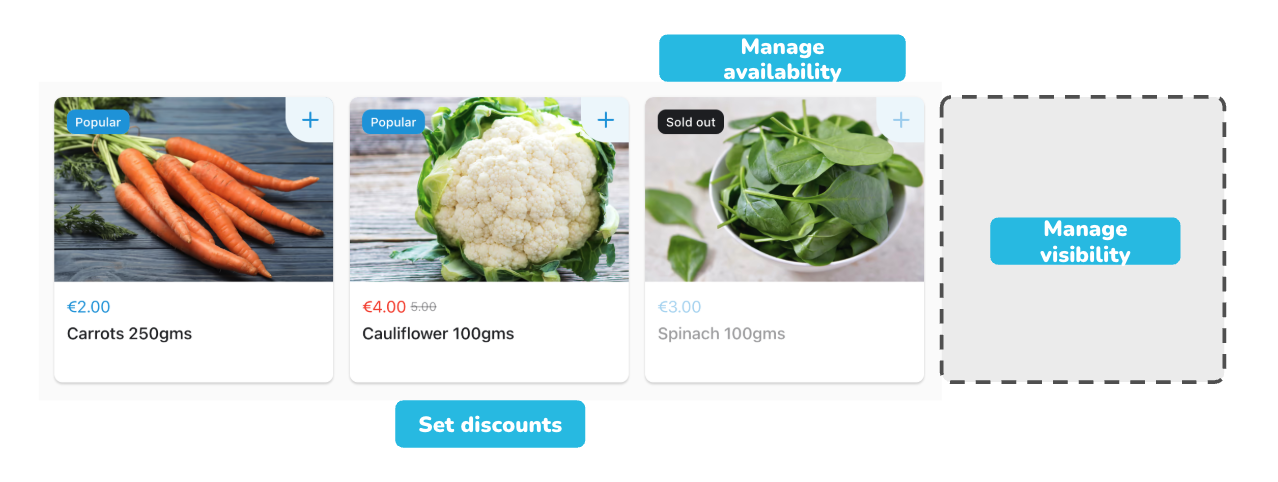
allow you to update in real-time any or a combination of:
Prices
Set discounted prices
Item availability, marking items in or out of stock
Item visibility, ideal for seasonal products that should stay hidden for the rest of the year
Can I create different promotion types through this endpoint?
No, you can create simple price discounts. Merchants have access to creating a varied range of promotion types in their Wolt Merchant Admin dashboard.
Inventory Updates
allow you to update in real-time:
stock count
Wolt will count down the stock based on items sold, there is no need for you to resend stock updates based on sales on Wolt.
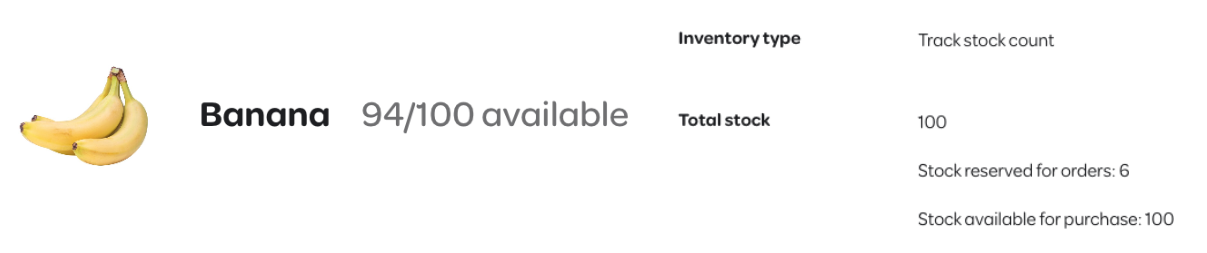
Do not use both inventory count with the in_stock: true or false, as this is a boolean way of handling stock availability and will interfere with your numerical stock count.
Integration Methods
Select the connection type that fits your infrastructure. We support real-time updates via our API (OAuth 2.0) or via SFTP.
API
OAuth 2.0 is required, check out our Guide
Rate Limits
| Operation | Limit |
|---|---|
| Update Items | 1 request / 15 minutes |
| Update Inventory | 1 request / 5 minutes |
SFTP
File type supported: CSV or JSON
Format: We support SSH keys using RSA or ECDSA encryptions in OpenSSH format.
Authentication method: SSH key.
Username: will be provided by Wolt after the public SSH key has been shared with Wolt.
Hostname:
| Environment | Server |
|---|---|
| Test | sftp-integrations.development.dev.woltapi.com |
| Production | sftp-integrations.wolt.com |
Sub-folder name
You will receive the venueID, and sub-folder names where you should drop each CSV or JSON file.
| Operation | Path for CSV files | Path for JSON files |
|---|---|---|
| Inventory update | {venueId}/INVENTORY_UPDATE_CSV/{filename}.csv | {venueId}/INVENTORY_UPDATE_JSON/{filename}.json |
| Item update | {venueId}/ITEM_UPDATE_CSV/{filename}.csv | {venueId}/ITEM_UPDATE_JSON/{filename}.json |
Required information from partners:
public SSH key in OpenSSH format, using RSA or ECDSA encryptions
an example CSV or JSON file with sample data, considering:
GTIN or SKU or POS ID is the first column, column name is arbitrary.
Negative values are not accepted.
Duplicated GTIN/SKU/POS ID are not accepted.
The discounted price must be lower than the normal price.
The delimiter of decimal numbers for price and discounted prices can be either a dot or a comma. For example: 5.5 or 5,5.
Spaces inside the fields and column names are no supported. For example: "ITEM NOT", "discounted price".
The file extension should always be in lowercase
.csvor.json. If it is in uppercase there will be a permission denied error when dropping the file.
A separate key is needed for the production and test environment
What Wolt provides you:
username
list of venueIDs; venueIDs are unique IDs for each location on Wolt. These are Wolt-generated and can't be changed to a partner's ID
Example Files
| Operation | Example CSV file | Example JSON file |
|---|---|---|
| Update item prices & item visibility | item-and-visibility.csv | item-and-visibility.json |
| Update inventories | inventory.csv | inventory.json |